
v0.1.0
Quick start
AI-Friendly DS of Muse
Readable to AI Agents. With headless and ready-to-use components. Including ds tokens, tools and Codegen flow - design to code transformation tool.

Web Foundation →

Echo Web →
Echo RN →

Echo Design System
A set of components, utilities, common types and styles that may and should be used for building the design system of Echo web.

Github
Environment configuration,
tooling, and composition guides


Figma
Our approach includes design
guidelines, a cohesive visual language
Architecture
Basic principles and ideology concepts
Processes
How we interact with others and
way we work
AI Codegen flow
Our code generation flow is a structured pipeline that transforms Figma designs into fully typed, validated, and production-ready code. It is built as a sequence of layers, each progressively reducing ambiguity and increasing determinism.
01
Figma
Designs
The process starts with properly prepared design files.
To enable reliable code generation, designs must follow strict rules:
- components are used instead of arbitrary frames
- all properties are defined via Styles and Variables
- components include descriptions, annotations, and metadata nodes
This step establishes the foundation for machine-readable design.
Design Lint
validation
Before entering the pipeline, designs are validated:
- compliance with the token system
- structural correctness of components
- readability and predictability for models
This step ensures that only clean, consistent inputs proceed further. Figma lint it’s a our own plugin developed specially for Muse needs
02
Design
to DSL
The output of Figma Lint Plugin is a Design Component Specification (DCS) — an intermediate DSL-based model that includes:
- variants
- component anatomy
- state machine
- layout constraints
- behavioral models
This is the key transition from design to a formal system model.
03
DSL
to DEV
DSL is arriving for developers, signaling the start of code generation.
Developers create a prompt, give the model extra context about the task, and define where the final files should be saved.
DSL transforms via LLM by converting domain-specific language into React components.
The process bridges specialized instructions with AI-driven code creation, enhancing developer productivity.
04
DSL
to LLM
The Design System Language (DSL) is a structured, machine-readable representation of components.
Key characteristics:
- formal enough for deterministic code generation
- validated via framework configuration
- decouples design intent from implementation
05
Code
generation
In the final stage, the DSL is compiled into code.
The generated output is:
- strictly typed
- token-driven
- validated against component anatomy
Supported generation modes:
- Full generation (greenfield components)
- Patch generation (LLM diff → PR)
- Constraint-based generation (e.g. styles only)
8. Output
06
Repo Security
01
3-Day Quarantine
Newly published packages cannot be installed immediately. Only packages that have been available for at least 3 days are allowed.
02
Restricted Sources
Dependencies can only be installed from trusted registries. No arbitrary GitHub links, no external archives, no unverified sources.
03
Protection Against Hidden Scripts
If a package did not previously execute scripts during installation, it cannot suddenly start doing so.
04
Private Registry
All internal packages are distributed through our private registry (Nexus) rather than via the public npm registry.
05
Strict Version Pinning
All versions are strictly locked: dependencies, package manager, and CI tooling.
06
Automated Auditing
Every pull request triggers automated dependency checks in CI
Figma Libraries
Echo App
This is a component library for the app that showcases the best patterns and product use cases.
Go there →
Echo Web
This is a library of web components that highlights top patterns and practical product applications.
Go there →

Echo Assets
Introducing a library of icons and assets designed for your app, featuring top-notch patterns and practical use cases.
Go there →
Figma Lint Plugin
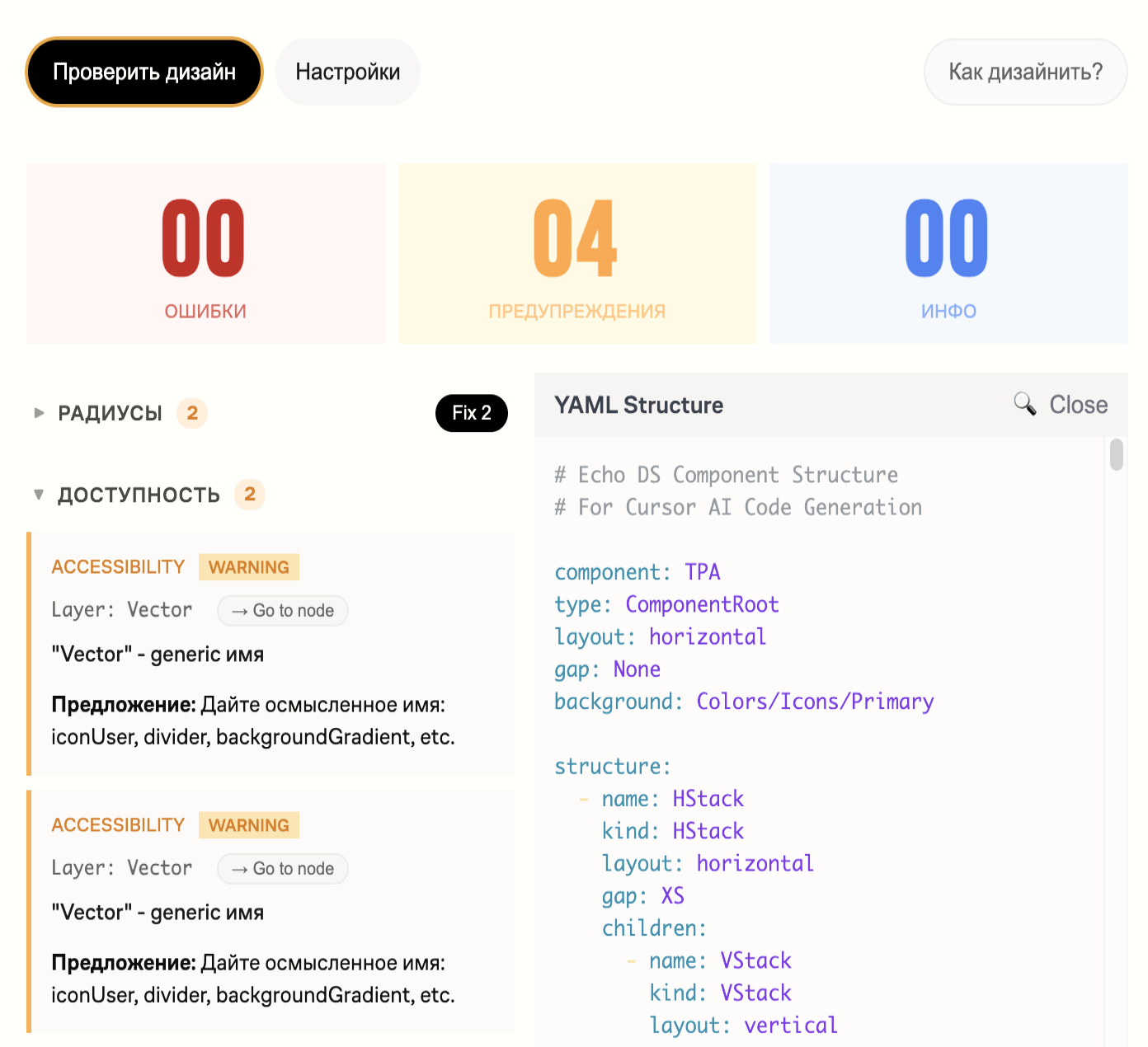
Our Figma lint plugin transforms design files into a structured DSL in YAML format, making layouts, components, and rules easily readable for AI.
It standardizes design output, reduces ambiguity, and ensures consistency across the system by encoding visual decisions into a clear, machine-friendly format.
Try it out!
Testing
Echo DS provides with testing tools. We use Chromatics combined with AI for writing tests. As a result we have interactive, accessibility, unit, visual tests and full test coverage for all components.
Unit
Core logic validation, component behavior, edge cases, and deterministic outputs
Accessibility
Standards compliance, automated audits, assistive technology support, inclusive UX validation
Interactive
User flows, state transitions, event handling, and real interaction scenarios
Visual
UI consistency, layout integrity, regression detection, and pixel-level validation
Storybooks
We build unified experience based on a company needs. It’s flexible, adaptive and functional. To start use it follow the ling. Here we have products Storybook's with documentation & stories chapters about components. Also it contain design gudelines and foundation visual principles.
Web Foundation →
Echo Web →
Echo RN →
Contact us in case of question
We are welcoming you to share with us any possible feedback or ask any question related to the product development process using Design-system! Feel fre to write me in DM - d.krikunov@mu.se.

In case of questions
These channels will help you to find an answer on any question somehow connected to the DS or around it. Please welcome with your ideas and problems here:
Channels:
#ug-design-system
#ug-design-system
#mu-design-system
#au-design-system
Your DS team

Dmitrii Krikunov
Design-system architect
d.krikunov@mu.se

Vitaliy Kapustyanov
Senior Designer
v.kapustyanov@mu.se

Alexander Komarov
Senior Frontend
a.komarov@mu.se

Azamat Dzebisov
Senior Frontend
a.dzebisov@mu.se

Andrey Yakobchuk
Head of Frontend
a.yakobchuk@mu.se